
Contributions
Plugin
A scalable plugin designed to help engineering teams manage and track code contributions across open-source and internal projects. I led UX research, user flows, interaction design, and high-fidelity UI as part of my ongoing ownership of the developer platform.
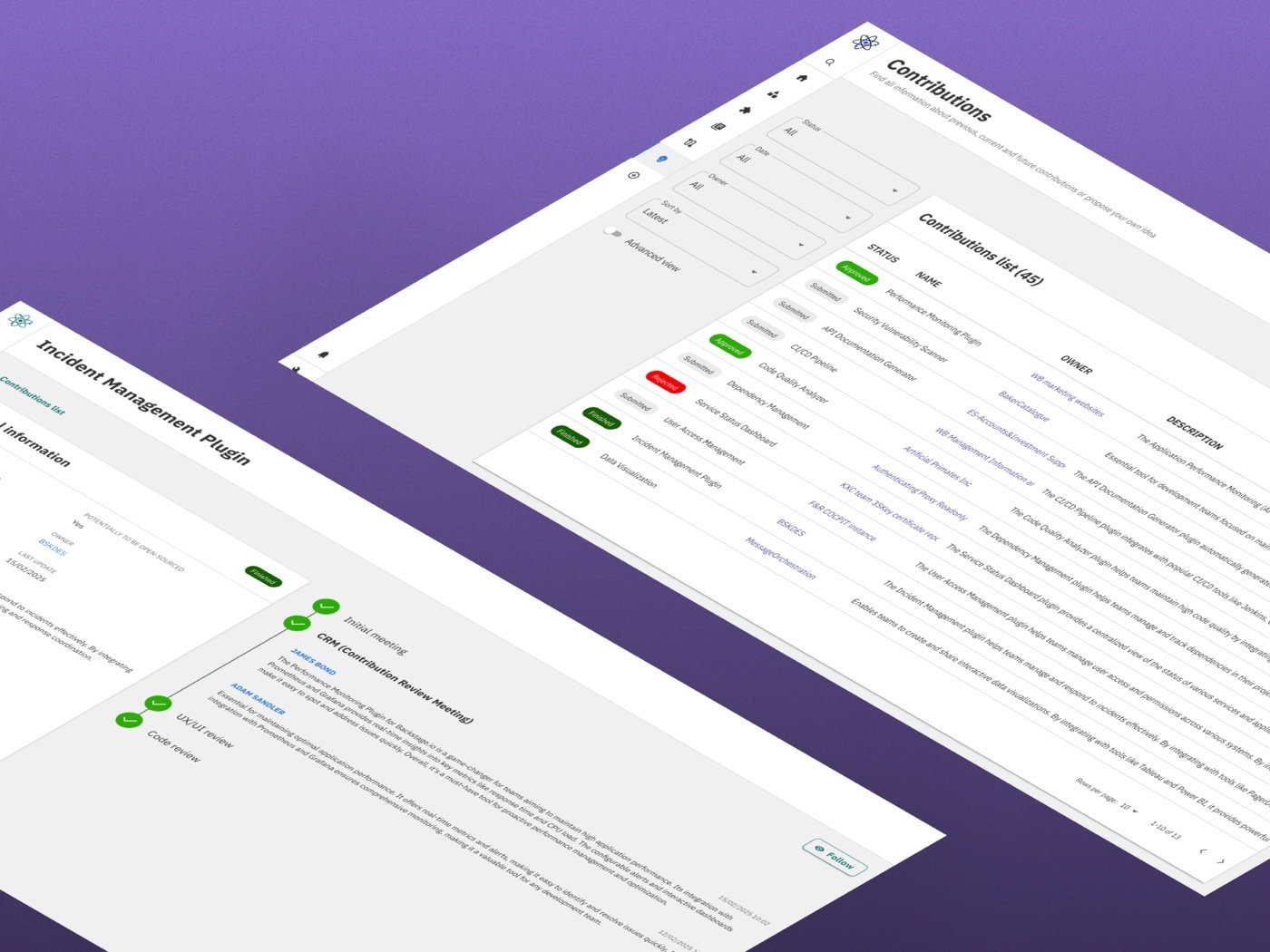
As the Backstage ecosystem grew, the contribution process became harder to navigate. Engineers had no clear view of what was being built, what was approved or rejected, or how their work fit into the bigger picture.
I led the design of the Contributions Plugin as part of my ongoing ownership of the developer platform. The goal was a centralized, structured workflow - one transparent space connecting contributors, architects, and product owners.
Invisible ideas.
Delayed decisions.
Contributors were working blind. No visibility into what moved forward, what got cut, or the reasoning behind either. Reviewers had no shared space to assess proposals. Decisions were slow, inconsistent, and too often made without the full picture.
- Visibility gaps - contributors had no way to track what happened to their own ideas
- No centralized review — architects and product owners were working without a shared space
- Cross-timezone delays - async communication turned simple coordination into a bottleneck
- Critical next steps kept falling through the cracks, stalling decisions
- Scope was guessed, not agreed - contributors often started work before architects and managers had aligned with them on what the contribution should actually cover
"I submitted an idea three weeks ago and I still don't know if anyone even looked at it."
Listening to
both sides.
Methods used
Usability testing tasks
- Locate a rejected contribution and understand why it was declined
- Determine the current status of a pending idea
- Simulate a review process from an architect's perspective
Key findings
One thing stood out clearly in research: users wanted everything in one place. Filtering by status, ownership, and priority wasn't a nice-to-have — it was essential for both contributors and reviewers.
Color-coded status labels did more than look clean. Contributors could tell where an idea stood without asking. Reviewers could prioritize their queue without reading every proposal top to bottom.
In testing, participants kept missing the primary review action. Proposals stalled, and nobody was quite sure who was supposed to move things forward.
Contributors frequently started building before architects and managers had actually aligned with them on what the contribution should cover. Making that agreement explicit upfront prevented rework later in the process.

From chaos
to clarity.
The Contributions Plugin gives the whole process a backbone. From idea submission to final decision, every stakeholder knows where things stand and what they need to do next.
What we built
One overview, everything filterable. Status, ownership, priority - all readable at a glance. No need to open a single proposal to know what needs attention.
Descriptions, linked resources, assigned stakeholders, full decision history — all in one view. Nothing buried, nothing missing.
Every idea follows a clear path — submission, review, decision. Visible stages throughout, so nobody's left guessing what comes next.
Contributors get updates as things move — no chasing, no silence, no ideas disappearing into a void.
The UI was built on our internal design system — a component library based on Material UI, styled to organisational standards. It kept things visually consistent with the existing Backstage.io platform while leaving room for plugin-specific needs.
The design,
view by view.
Everything at a glance
The main view surfaces all contributions across the organisation. Advanced filtering allows quick narrowing by status, owner, or priority — reducing the time needed to assess a backlog of proposals.
- Centralized view for contributors and reviewers alike
- Status tags make priority legible at a glance
- Consistent with the broader Backstage.io UI
Clear, structured proposals
The list view shows all submitted contributions with key metadata visible without opening each item — ownership, status, submission date, and linked resources are all immediately accessible.
- Ownership prominently displayed
- Status color-coding reduces scan time
- Linked resources visible without extra navigation
Find what matters fast
Advanced filter controls let reviewers surface high-priority items or track specific contributors without scrolling. Filter state is persistent — so returning to a review session picks up exactly where you left off.
- Filter by status, owner, date, and category
- Persistent filter state across sessions
- Reduces time-to-decision for architects
A complete audit trail
Completed contributions display the full decision history — what was accepted, modified, or rejected, and by whom. Contributors gain closure; reviewers maintain accountability.
- Full decision history visible to all stakeholders
- Clear distinction between accepted, rejected, and modified
- Reduces follow-up questions after review
Structured review workflow
The admin view provides a step-based review workflow — guiding reviewers through a defined process from submission to approval or rejection. Primary actions are visually dominant to prevent the "invisible next step" problem found in research.
- Step-based workflow guides reviewers clearly
- Primary CTA impossible to miss
- Automated notifications triggered at each stage
What changed
after launch.
Contributors can see exactly where every idea stands, in real time. No more follow-up Slack messages. No more digging through Azure threads to find out what happened.
Structured workflows and clear review actions made the gap between submission and decision noticeably shorter. Teams spread across timezones felt it most.
Automated notifications handled the status updates. Stakeholders stayed informed without anyone having to chase anyone - and communication channels stayed clear for work that actually mattered.
Architects, managers, and contributors now settle on scope before work starts, instead of contributors guessing at it and finding out later it didn't match.
The work didn't stay internal. The plugin was contributed back to the Backstage.io open source ecosystem, putting it in front of teams well beyond a single organisation.